

Skills Inventory Tool
Build a taxonomy that's uniquely yours.
Manufacturing, field services, sales, tech or management, no matter the skills, we manage them.
Your organization has its own language, its own structure, and its own way of thinking about capability. Skills Base reflects that — from individual skills to the org-wide framework.
Trusted by 400+ Global Organizations

Skills Base hits the sweet spot in tracking the granularity of skills needed, in a scalable and dynamic way to keep up with the pace of the Cyber Security industry.

Global Consulting Firm,
Principal, Cyber Security
Categories, skills, and everything between.
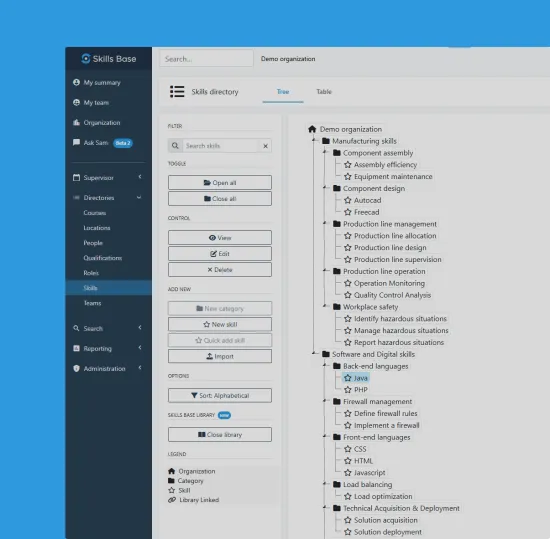
A well-designed taxonomy is the foundation of everything. Structure your skills into meaningful categories that mirror how your organization actually thinks, allowing you to track all of the skills that matter across industrial, frontline, management, support and everything in between.
From there, build the skills, sub-skills, and proficiency levels that give every role a clear capability blueprint and align the skills needed with the work to be done.
Unlimited
Skills, categories and sub-categories
Flexible
Build it your way. Your structure, your language, your rules.
Single source
One verified taxonomy across your entire organization

Hierarchical structure
Organize skills into categories and sub-categories. Create as many levels of depth as your business needs. Automation and optional-AI ensure the process is simple and low effort.
Your language, your labels
We don’t expect you to manage your business according to a skills model that is foreign to you. Name skills and categories exactly as your organization refers to them. No enforced frameworks, no generic defaults.
Hard skills and soft skills
Model both technical capabilities and behavioural competencies in a single taxonomy and align to training and workforce deployment to automate the end-to-end process.
Map skills to roles, at any scale.
A taxonomy only becomes useful when it connects to roles and informs the work to be done. Organize your skills into categories that map directly to the functions, role families and L&D initiatives in your organization — every role has a clear, manageable set of skills attached to it, not an overwhelming list.

Define what good looks like.
Proficiency only means something when everyone agrees on what it means. Build rating scales and assessment schemas that give every score a shared, precise definition — so data from across your organization is truly comparable.
Flexible scale points
Choose Yes/No, 3, 5 or any point scale depending on your requirements.
Descriptive level definitions
Write precise behavioural descriptions for each level. Eliminate subjectivity. Assessors and employees share the same reference point.
Skills inventory assessment
Run structured assessments against your taxonomy to build a verified skills inventory. Capture self-assessed and manager-validated proficiency levels across every skill in your framework.
Four ways to build your taxonomy.
Skills Base includes tools that make it easy to load, create or import your own taxonomy. Choose the path that fits your team’s time, expertise, and ambition. Move between them as you grow. Model the skills that matter to you.
Build & import manually
Start from a blank taxonomy. Define your own categories, skills, and proficiency levels from the ground up, then import existing data via CSV or spreadsheet. Best for teams with a clear existing framework they want to migrate.
Use the Skills Base Library
Start from our curated collection of pre-built skills data templates — organized by role type. Import a full category, cherry-pick individual skills, or blend templates across domains. Then customize everything to match your language.
Work with our dedicated customer success
Engage our skills framework specialists to audit your existing data, interview your teams, and recommend a taxonomy structure that fits your organization’s design and strategic goals. We do the heavy lifting — you validate and approve.
Let AI infer your taxonomy
Connect your HRIS, job descriptions, or performance data and let our AI tools analyze your organization’s existing language to infer a draft taxonomy. Review, refine, and publish — your taxonomy shaped by how your organization already talks about skills.
AI for your Skills Taxonomy
Build smarter. Stay current.
Your taxonomy isn’t a one-time project. Skills Base helps you build it faster, keep it accurate, and surface the gaps and inconsistencies that are invisible until they’re not.
- Skills Base Insights
Taxonomy Health & Gap Intelligence
Continuously analyzing your taxonomy for structural gaps, stale skills, and coverage blind spots — so your framework stays accurate as your organization evolves.

Skills Management
Everything you need to manage skills at scale.
SkillsBase is a complete skills management system — not just a reporting tool. Every capability your organisation needs, connected in one place.
01
Track
Skill and certification tracking in one place. Maintain a single source of truth for your workforce data — always current, always verified, always trusted.
Skills Tracking ->
02 – You are here
Model
Build a skills taxonomy that’s uniquely yours. Define the language, structure, and proficiency levels that reflect how your organisation actually thinks about capability.
Skills Taxonomy ->
03
Map
Align your skills data to your business architecture and design. Understand how capability maps to your organisational structure, functions, and strategic priorities.
Skills Mapping ->
04
Measure
Uncover gaps, strengths, and interest levels across your workforce. Go beyond headcount and job titles to see what your people can actually do — and what they want to develop.
Skills Assessment ->
05
Compare
Skills matrices that update in real time. View skills data side by side across teams, roles, and individuals — dynamically filtered to surface exactly what you need to see.
Skills Matrices ->
06
Analyze
Deep insight and rich visualizations to support every talent decision. From team-level reporting to org-wide trends, turn your skills data into intelligence that drives action.
Skills Analysis ->
The Skills Taxonomy FAQ: Structuring Your Data
Everything you need to know about building and managing your skills taxonomy in Skills Base.
What is a skills taxonomy?
A skills taxonomy is the structured backbone of your talent strategy. It is more than just a flat list of buzzwords; it is a comprehensive inventory of every skill, certification, and competency required to run your business. These data points are organized into logical groups and clusters, creating a unified framework that defines exactly what “good” looks like across the organization.
How is a taxonomy different from a simple skills list?
A simple list is unstructured and often repetitive (e.g., having separate entries for “Sales,” “Selling,” and “Business Development”). A taxonomy—or ontology—creates a standardized architecture. It defines the relationships between a broad competency and specific technical skills, ensuring that the entire workforce speaks the same language. This structure transforms chaotic data into a searchable directory of organizational capability.
Why can't we just manage our skills inventory in Excel?
Spreadsheets are two-dimensional tools ill-suited for a multi-dimensional ontology. A spreadsheet forces you to treat skills as a static text list, making it nearly impossible to map complex relationships between roles, proficiency levels, and adjacent skills. A dedicated platform turns this directory into a living ecosystem, allowing your workforce data to remain dynamic, scalable, and verified without the version-control nightmares of Excel.
How granular should our skills directory be?
Finding the right balance is key. If your inventory is too broad (e.g., “Communication”), the data becomes actionable. If it is too granular (e.g., “Writing email subject lines”), the ontology becomes bloated and unmanageable. Best practice suggests mapping skills at a “transferable” level—focusing on the core competencies that define a role’s success—so that you can easily match talent to opportunities across different departments.
Why is a standardized ontology important for internal mobility?
Without a standardized inventory, one department might call a skill “Client Relations” while another calls it “Account Management.” This disconnect makes it impossible to see who in your workforce could transfer to a new role. A unified ontology removes these silos, creating a clear directory of transferrable skills that empowers talent to move vertically or laterally within the company.
Where do we start when building a skills taxonomy?
Do not try to build a perfect ontology from scratch. Start by auditing your existing job descriptions and learning content to create a baseline list. Then, validate this initial inventory with your subject matter experts. The goal is to establish a “Minimum Viable Taxonomy” that covers your critical roles first, allowing you to capture essential competency data immediately while you expand the directory over time.
Ready to uncover hidden opportunities?
Join 400+ organizations using using Skills Base to manage verified skills data
- Free for 25 Users
- Free trial available
- No Credit Card required